— Invoicing
Freelance invoicing that starts from the work you already logged
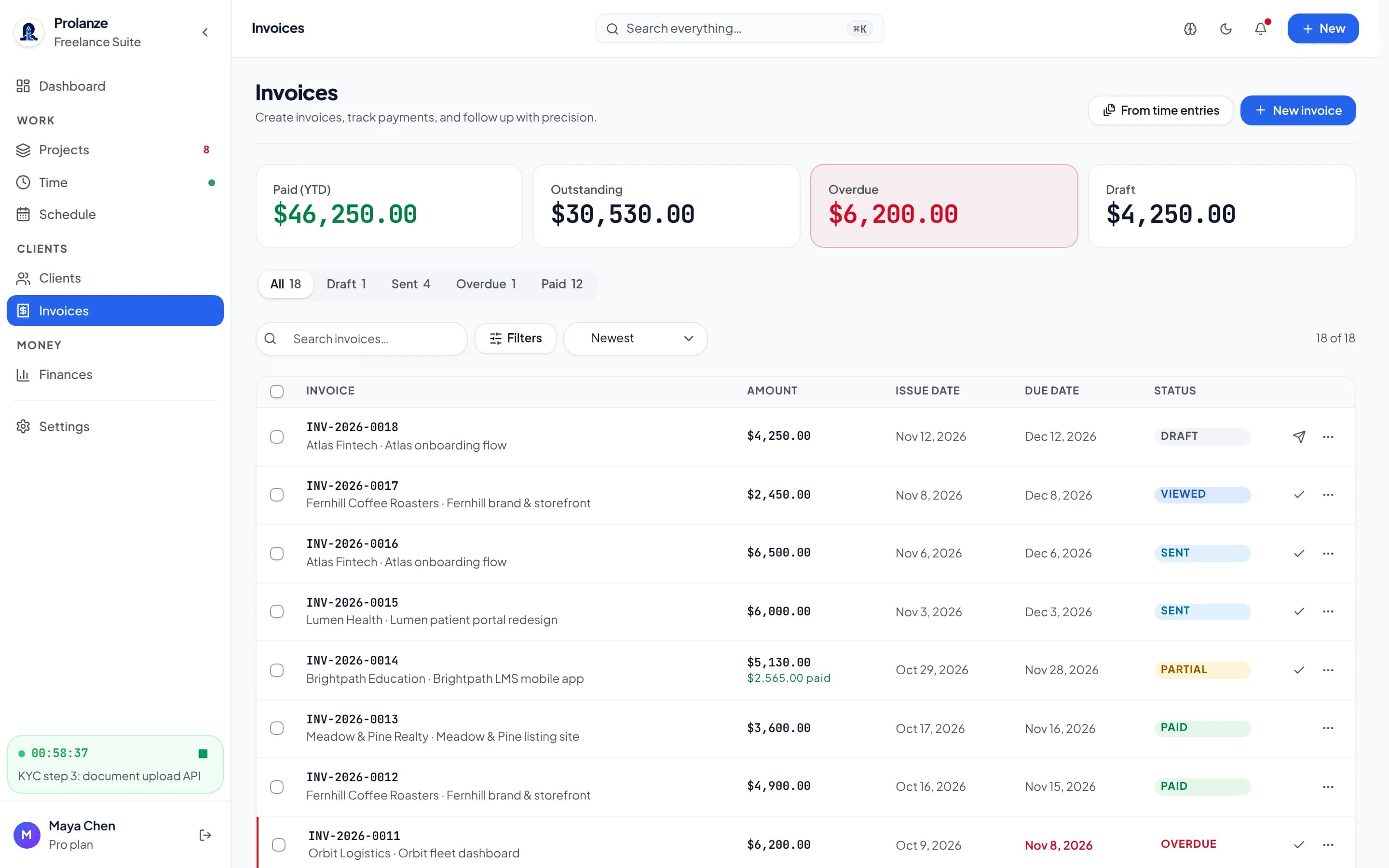
Prolanze turns tracked hours, milestones and billable expenses into draft invoices, sends them when you say so, and keeps a clear record of what each client owes. You can do it in the app, or ask Claude to do the drafting while you keep the final say.
Why freelance invoicing takes longer than it should
For most freelancers the invoice is the last step of a chain that lives in different places: hours in a time tracker, tasks in a board, rates in a spreadsheet and the invoice itself in a template you fill in by hand. Every month you rebuild the same numbers, and every manual copy is a chance to under-bill.
Prolanze keeps that chain in one workspace. The hours you log against a project are already priced at that project's rate, so an invoice is a selection, not a re-typing exercise.
How invoicing works in Prolanze
Every invoice starts as a draft. You can build one line by line, or create it from all the unbilled billable time on a project, or from the specific time entries you pick. Billable expenses can be added as their own line, and a milestone can be set to create a draft invoice automatically when you mark it complete.
Drafts carry the details clients and accountants ask for: issue and due dates, a subject and notes, a PO number, tax, a discount and the invoice currency. Once time is on an invoice it is locked, so the same hour cannot be billed twice.
- Draft from a project's unbilled hours, from chosen time entries, or from scratch
- Add billable expenses to a draft as a separate line
- Milestones can create a draft invoice when they are completed
- Recurring invoice schedules generate drafts weekly, every two weeks, monthly or quarterly
- Tax, discount, PO number, notes and per-invoice currency
Sending, reminders and getting paid
When a draft is ready you email it to the client from Prolanze. Your client opens the invoice from a link, with no account and no password, and can download the PDF. Your payment instructions sit on the invoice itself.
Prolanze does not take card payments on invoices today. When the money arrives you record the payment, in full or in part, and the invoice's balance updates. Overdue invoices are listed with how many days late they are, and you can send a reminder in one step. Every email that went out, and when, is kept in the invoice's history.
Invoicing from Claude, with you in charge
Because Prolanze includes a full MCP server, Claude and Claude Code can do the drafting for you. On the Pro plan your assistant can create and update drafts. Anything that reaches your client or changes what you are owed, such as emailing an invoice, sending a reminder, recording a payment or cancelling an invoice, always shows you a preview first and only happens after you approve that exact action.
On the free plan the connection is read only, which is still useful: ask what is overdue, what is unbilled, or what you invoiced last quarter, without opening a dashboard.
Ask your assistant
Real requests and the Prolanze MCP tools Claude calls to answer them. Read-only requests work on the free plan; changes need Pro.
› What's overdue, and by how many days?
list_overdue_invoices
A list of unpaid invoices past their due date, most overdue first. Read only, works on Free.
› Draft this month's invoice for Atlas from my unbilled hours.
list_projects · create_invoice_from_project
A draft invoice with one line per time entry at the project rate. Nothing is sent.
› Send it, and remind Orbit about INV-0011.
check_invoice_international · send_invoice · send_invoice_reminder
Your assistant shows you each email first. Nothing goes out until you approve it.
› Atlas paid $2,000 today. Record it.
record_payment
A preview of the payment, recorded only after you confirm. The balance due updates.
Free and Pro
Free
- 5 invoices a month
- 1 client invoice link
- Assistant can read invoices, not change them
Pro
- Unlimited invoices and client invoice links
- Assistant drafts invoices from your time
- Recurring invoice schedules from your assistant
Every new account gets 30 days of Pro, no card required. Full plan details are on the pricing page.
Questions about invoicing
Can clients pay my invoice online by card?
Not today. Clients open the invoice from a link and can download the PDF. Your payment instructions are on the invoice, and you record the payment in Prolanze when it arrives.
Do my clients need a Prolanze account?
No. They open the invoice from a link, with no account and no password.
Can I invoice in my client's currency?
Yes. Each invoice carries its own currency. Reports convert amounts with stored exchange rates and say which rate they used, and amounts in different currencies are never added together silently.
Can my assistant send an invoice without asking me?
No. Emailing an invoice or a reminder, recording a payment, marking an invoice paid and cancelling an invoice always show you a preview first, and only happen after you approve that exact action.
Can the same hours end up on two invoices?
No. Once a time entry is on an invoice it is marked as billed and locked, so it cannot be billed again or edited.
Keep reading
- Time tracking →A timer and a weekly timesheet. Billable hours become invoice lines.
- MCP server →125 tools for Claude and Claude Code, with approvals and no deletes.
- Automate freelance invoicing with Claude Code →Step-by-step guide
- How to price freelance work →Hourly, fixed or value-based, and what to charge
- Freelance invoice template guide →What an invoice needs, with a template